


CRM System Architecture: Components, Data Model, Integrations, and Security (Simple Guide)
CRM System Architecture (Simple Explanation)
Most CRM problems don’t start with bad sales reps. They start with bad structure: messy data, unclear ownership, weak integrations, and no security rules. That’s why understanding CRM system architecture matters—even if you’re not technical.
Definition (snippet-ready):
CRM system architecture is the design of how a CRM setup stores customer data, manages workflows and pipelines, integrates with other tools (email, calendar, marketing, billing), and controls access and security across users and teams.
Big picture:
A CRM isn’t one tool—it’s a system where data, rules, and people interact. Architecture determines whether the system stays trustworthy or slowly breaks.
Jump To
- What a CRM architecture includes
- Core components
- CRM data model
- Automation & workflow layer
- Integrations layer
- Security, roles, and permissions
- Deployment types
- Reference architecture
- Common mistakes
- FAQs
What a CRM Architecture Includes
A CRM works through four layers:
- User experience layer (what people click)
- Data layer (where customer info lives)
- Business logic layer (rules, pipeline behavior, automation)
- Analytics layer (reports and dashboards)
If one layer fails, the CRM becomes:
- a data graveyard
- an automation nightmare
- or a reporting lie
Good vs Bad Architecture
Good architecture
- One owner per lead/deal
- One next action on every active deal
- Clean, consistent pipeline stages
Bad architecture
- Shared ownership
- Optional fields that matter
- Silent automation changing records
This is why teams stop trusting CRMs.
Core Components of CRM System Architecture
1) Front-End (UI Layer)
- Contact timelines
- Pipeline views
- Task lists
- Dashboards
If UI is slow or confusing, adoption drops.
2) Application Layer (CRM Engine)
- Record creation
- Stage movement
- Required fields
- Owner assignment
- Workflow triggers
- Permission checks
If CRM feels “random,” rules live here and are poorly defined.
3) Data Layer
Stores:
- Leads
- Contacts
- Accounts
- Deals
- Activities
Rule: Dirty data breaks automation, reporting, and forecasting.
4) Reporting & Analytics Layer
Generates:
- Pipeline reports
- Conversion rates
- Activity tracking
- Forecasts
If stages aren’t used consistently, reports lie.
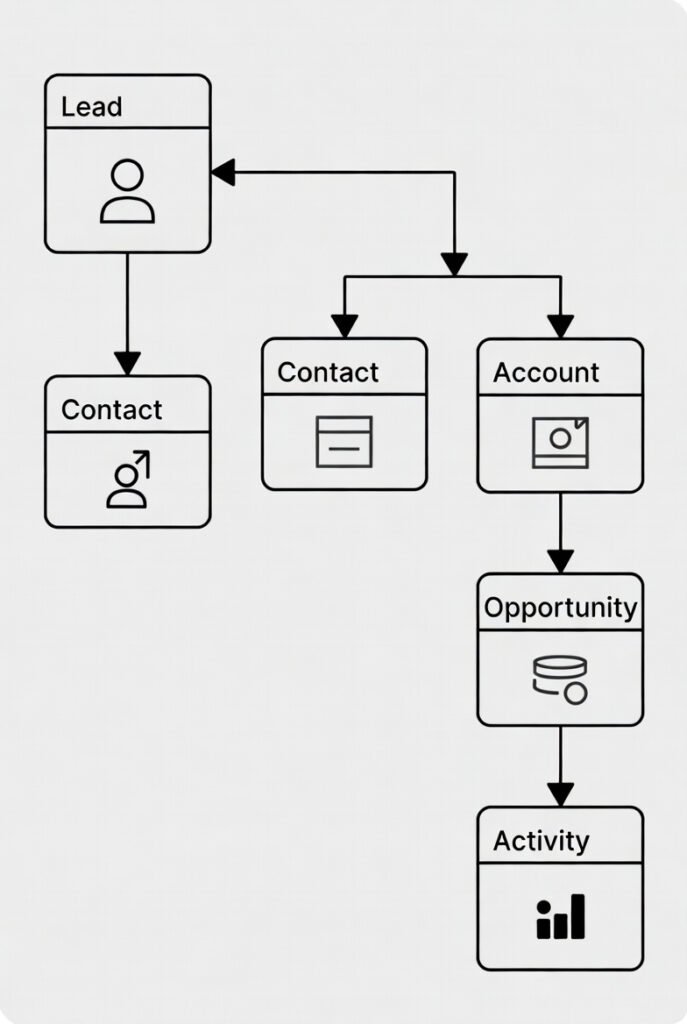
CRM Data Model (Objects That Matter)
Core CRM records:
- Lead — early inquiry
- Contact — person
- Account — company
- Opportunity / Deal — potential sale
- Activity — calls, tasks, meetings
Mental model:
- Contacts belong to Accounts
- Deals belong to Accounts
- Activities attach everywhere
If a CRM can’t link these cleanly, it’s not built for real pipeline work.
Automation & Workflow Layer
Automation = rules tied to data and stages.
Examples
- New lead → assign owner + create call task
- Proposal Sent → follow-up task in 2 days
- No activity → notify manager
- Closed-won → onboarding crm checklist
Rule:
If a human wouldn’t trust the action, don’t automate it yet.
Start with 3–5 automations max.
Integrations Layer
Integrations turn CRM reporting into a real system.
Common integrations:
- Calendar
- Web forms
- Marketing automation
- Billing / invoicing
- Support tools
Integrations reduce manual work and improve adoption.
Security, Roles, and Permissions
CRMs store sensitive customer and revenue data.
Core concepts
- Roles
- Permissions
- Audit logs
- Export controls
Never skip
- Role-based access
- Audit logs
- Export restrictions
Deployment Types
Cloud CRM
Pros: easy setup, updates, integrations
Cons: subscriptions, vendor dependency
On-Prem CRM
Pros: control
Cons: maintenance and security burden
For most SMBs, cloud CRM wins.
Reference Architecture (Copy This)
Layer 1 — Capture
- Forms
- Chat / WhatsApp
- Imports
Layer 2 — CRM Core
- Contacts / Accounts / Deals
- Pipeline stages
- Tasks + next action rule
Layer 3 — Automation
- Owner assignment
- Follow-ups
- Renewals
Layer 4 — Integrations
- Email & calendar
- Marketing
- Billing
Layer 5 — Analytics
- Lead source performance
- Conversion rates
- Forecasts
Minimum Viable CRM Data Fields
Leads / Contacts
- Name
- Email / phone
- Source
- Owner
- Status
Deals
- Stage
- Amount
- Close date
- Next action
- Loss reason
Common Architecture Mistakes
- No standard stages
- No ownership
- Too many fields
- No integrations
- Poor data hygiene
- Automation overload
FAQs
What are the main components of a CRM system?
UI, data layer, business logic, analytics, and integrations.
What is the CRM data model?
How leads, contacts, accounts, deals, and activities relate.
Do I need integrations?
CRM works without them, but adoption improves with email/calendar.
Cloud vs on-prem CRM?
Cloud is simpler for most SMBs.